Showing posts with label gae. Show all posts
Showing posts with label gae. Show all posts
March 01, 2011
303
This is my last blog post here on blogger.com! You'll find my new thoughts, projects and development ramblings at http://dlinsin.github.com.
I migrated to blogger.com in late 2005 and was always quite happy with it. More than 5 years and exactly 502 posts later it's time to move on to something new.
Subscribe to my new blog feed, check my stuff on github or follow me on Twitter.
July 19, 2010
Apple Push Notifications on Google Appengine
 Last year, I worked on a Nine Men's Morris (Mühle) implementation for Android, called Doublemill. Since I'm an iPhone user, I decided to port the game to iPhone/iPod touch and the iPad. There are 3 versions: Doublemill Premium, Doublemill Lite and Doublemill for iPad.
I've written about the Google Appengine (GAE) a couple of times before and the same goes for Apple Push Notifications (APN). For Doublemill I had to bring those two technologies together and it was a pain and pleasure at the same time.
Let me start with the pain! Apples Push Notifications in a restricted environment like the Google Appengine is no fun to implement! My first approach was to use notnoop's java-apn, which I've used before and works quite well. Unfortunately, there is currently no way of using a client certificate, which you'll need in order to talk to Apple's server on the Google Appengine. There are some javax.security classes missing on GAE.
That's where the pleasure part begins! Thanks to Urban Airship, it's easy to hook up your application running on Google Appengine to Apple's Push Notifications! And the best part - it's free (although not unlimited)! Urban Airshipe provides an easy to use REST interface, which you can call from your Java code on GAE with a good old HttpURLConnection. It uses Basic Auth over Https to ensure that only your application can send Push Notifications to your iPhone App.
I won't provide any code for you here, because it's the basic concept that's the most interesting part when bringing APN to GAE. The first thing you need to do, is store your user's deviceToken. You should do that each time the App launches, to ensure it's the correct token. That token, along with the information you want to present to your user, needs to be passed to Urban Airship's REST interface, everytime you want to send a notification. A Cron Job or Task on Google Appengine could handle that for you.
If your application is designed with notifications in mind, then it's quite easy to bring Apple Push Notifications to the Google Appengine, thanks to Urban Airship!
August 24, 2009
Http Basic Authentication with Android
The Google App Engine infrastructure, I'm developing in my spare time, is meant to be used by an Android client. To give our users at least a vague feeling of security, we decided to use a Basic Authentication together with HTTPS. Apparently, Android 1.5 is shipping with Apache's HttpClient 4.0 Beta2, which has a pitfall, when it comes to Basic Authentication.
When you search for HttpClient and Basic Authentication, Google will most definitely send you to the official documentation of HttpClient 3.x, which shows you, how to do Basic Authentication in a preemptive way. That means, sending the client's credentials with every request, instead of waiting for a 401 Unauthorized response and only then sending the credentials. That's probably what you want to in the first place, because it saves your client a request.
This sample code won't compile with HttpClient version 4. The method called setAuthenticationPreemptive is missing. The problem is, if you omit this very method call, the code still works, but the authentication is not preemptive. We missed this little detail and only noticed after a while, that every request was preceded by a 401 Unauthorized request/response cycle. That doubled the amount of requests we served.
The HttpClient 4 documentation shows how to do preemptive authentication with the new API. You need to implement a so called HttpRequestInterceptor:
It basically sets the Basic Authentication headers, before each requests and thus avoids the 401 response. In order for the interceptor to work, you need to add it to the request chain:
You might also run into the problem of using the old HttpClient 3.x way of doing Basic Authentication. It does work, but it's not preemptive, which you might not notice right away. Save yourself some time and checkout the sample code provided by Apache.
Furthermore, I wasn't abel to find any official site, which states the version of HttpClient, used in Android 1.5. There are various sources, you might encounter, when searching Google, but I would like to see an official site, that states the version. A reason for Google not to reveal this information might be, that they adopted HttpClient and thus are not compatible anymore. However, to avoid mistakes and confusion, it would be nice to know, on which version the Android HttpClient is based on.
When you search for HttpClient and Basic Authentication, Google will most definitely send you to the official documentation of HttpClient 3.x, which shows you, how to do Basic Authentication in a preemptive way. That means, sending the client's credentials with every request, instead of waiting for a 401 Unauthorized response and only then sending the credentials. That's probably what you want to in the first place, because it saves your client a request.
HttpClient client = new HttpClient();
client.getParams().setAuthenticationPreemptive(true);
Credentials defaultcreds = new UsernamePasswordCredentials("username", "password");
client.getState().setCredentials(new AuthScope("myhost", 80, AuthScope.ANY_REALM), defaultcreds);
This sample code won't compile with HttpClient version 4. The method called setAuthenticationPreemptive is missing. The problem is, if you omit this very method call, the code still works, but the authentication is not preemptive. We missed this little detail and only noticed after a while, that every request was preceded by a 401 Unauthorized request/response cycle. That doubled the amount of requests we served.
The HttpClient 4 documentation shows how to do preemptive authentication with the new API. You need to implement a so called HttpRequestInterceptor:
HttpRequestInterceptor preemptiveAuth = new HttpRequestInterceptor() {
    public void process(final HttpRequest request, final HttpContext context) throws HttpException, IOException {
        AuthState authState = (AuthState) context.getAttribute(ClientContext.TARGET_AUTH_STATE);
        CredentialsProvider credsProvider = (CredentialsProvider) context.getAttribute(
                ClientContext.CREDS_PROVIDER);
        HttpHost targetHost = (HttpHost) context.getAttribute(ExecutionContext.HTTP_TARGET_HOST);

        if (authState.getAuthScheme() == null) {
            AuthScope authScope = new AuthScope(targetHost.getHostName(), targetHost.getPort());
            Credentials creds = credsProvider.getCredentials(authScope);
            if (creds != null) {
                authState.setAuthScheme(new BasicScheme());
                authState.setCredentials(creds);
            }
        }
    }
};
It basically sets the Basic Authentication headers, before each requests and thus avoids the 401 response. In order for the interceptor to work, you need to add it to the request chain:
DefaultHttpClient httpclient = new DefaultHttpClient();
httpclient.addRequestInterceptor(preemptiveAuth, 0);
You might also run into the problem of using the old HttpClient 3.x way of doing Basic Authentication. It does work, but it's not preemptive, which you might not notice right away. Save yourself some time and checkout the sample code provided by Apache.
Furthermore, I wasn't abel to find any official site, which states the version of HttpClient, used in Android 1.5. There are various sources, you might encounter, when searching Google, but I would like to see an official site, that states the version. A reason for Google not to reveal this information might be, that they adopted HttpClient and thus are not compatible anymore. However, to avoid mistakes and confusion, it would be nice to know, on which version the Android HttpClient is based on.
August 10, 2009
Cron Jobs on Google App Engine
I've been developing for the Google App Engine (GAE) for a couple of months now and there's a lot, I want to talk about in future blog posts. This installment is about scheduled tasks on the GAE - cron jobs - and a couple of pitfalls that you should be aware of.
The configuration of a cron on GAE is pretty straightforward. You define your job in a file called cron.xml, which goes to your WEB-INF folder in your WAR file.
The file is easy to understand: url denotes where the GAE is supposed to send a GET request to, when the cron is triggered. Whatever you place behind the denoted url is your own choice. It can be a plain Servlet or some RESTful resource. The schedule tag contains a english-like syntax to define when the url is supposed to be requested. In this example GAE makes a HTTP GET request to http://yourname.appspot.com/cron/clean every 5 minutes.
One of GAE's subtle details is that your application is being shutdown, as soon as there are no requests coming in for a certain period of time. That's no a problem by itself, however, if you want to access the cached data of your application from within your cron, you are in trouble. It's not a severe problem, you just need prepared for it.
Another pitfall, that you might encounter, is configuring the url of the cron to be secured by SSL. You can define which urls are supposed to be confidential in your web.xml. As soon as you add your cron's url, you'll encounter an error message in your admin console under "Cron Jobs", which says "Too many continues". This indicates, that GAE wants to execute cron jobs using http instead of https, which leads to a HTTP 302 response. Browsers can easily interpret it as "don't use http, use https instead", but the GAE can't.
This is not a security problem, since the urls of your cron job should only be accessible by administrators anyways. You can easily exclude the cron's url from your SSL configuration and everything should work fine.
There are more little gotchas, that I encountered developing for the GAE and I'm going to blog more about it soon.
The configuration of a cron on GAE is pretty straightforward. You define your job in a file called cron.xml, which goes to your WEB-INF folder in your WAR file.
<?xml version="1.0" encoding="UTF-8"?>
<cronentries>
    <cron>
        <url>/cron/clean</url>
        <description>job to clean tmp every 5 minutes</description>
        <schedule>every 5 minutes</schedule>
    </cron>
</cronentries>
The file is easy to understand: url denotes where the GAE is supposed to send a GET request to, when the cron is triggered. Whatever you place behind the denoted url is your own choice. It can be a plain Servlet or some RESTful resource. The schedule tag contains a english-like syntax to define when the url is supposed to be requested. In this example GAE makes a HTTP GET request to http://yourname.appspot.com/cron/clean every 5 minutes.
One of GAE's subtle details is that your application is being shutdown, as soon as there are no requests coming in for a certain period of time. That's no a problem by itself, however, if you want to access the cached data of your application from within your cron, you are in trouble. It's not a severe problem, you just need prepared for it.
Another pitfall, that you might encounter, is configuring the url of the cron to be secured by SSL. You can define which urls are supposed to be confidential in your web.xml. As soon as you add your cron's url, you'll encounter an error message in your admin console under "Cron Jobs", which says "Too many continues". This indicates, that GAE wants to execute cron jobs using http instead of https, which leads to a HTTP 302 response. Browsers can easily interpret it as "don't use http, use https instead", but the GAE can't.
This is not a security problem, since the urls of your cron job should only be accessible by administrators anyways. You can easily exclude the cron's url from your SSL configuration and everything should work fine.
There are more little gotchas, that I encountered developing for the GAE and I'm going to blog more about it soon.
May 25, 2009
Make it Easy to Contribute
The past couple of weeks, I've been playing a lot with Restlet, a Java based REST framework. I like the it a lot, because it's easy to use and you can get it up and running in no time.
The current version of Restlet is 1.1, but when I compared it to the upcoming version 1.2-M2. it was clear that I would start using that right away. It has built in Google App Engine support and uses an Annotation driven approach, which increases testability and ease of use. This is one of the rare uses cases, where I think Annotations are perfectly suited, but I'm digressing. Overall, it was a natural choice to use the milestone build 1.2 right from the beginning.
After a couple of weeks of coding against 1.2-M2, I started to encounter a couple of weird side effects. After testing the code against the current stable version, it was clear, that it must be a bug in the 1.2 milestone release. So I checked the Restlet site, which nicely describes the process of reporting bugs.
As a decent developer, I followed the link to the issue tracker and saw this:
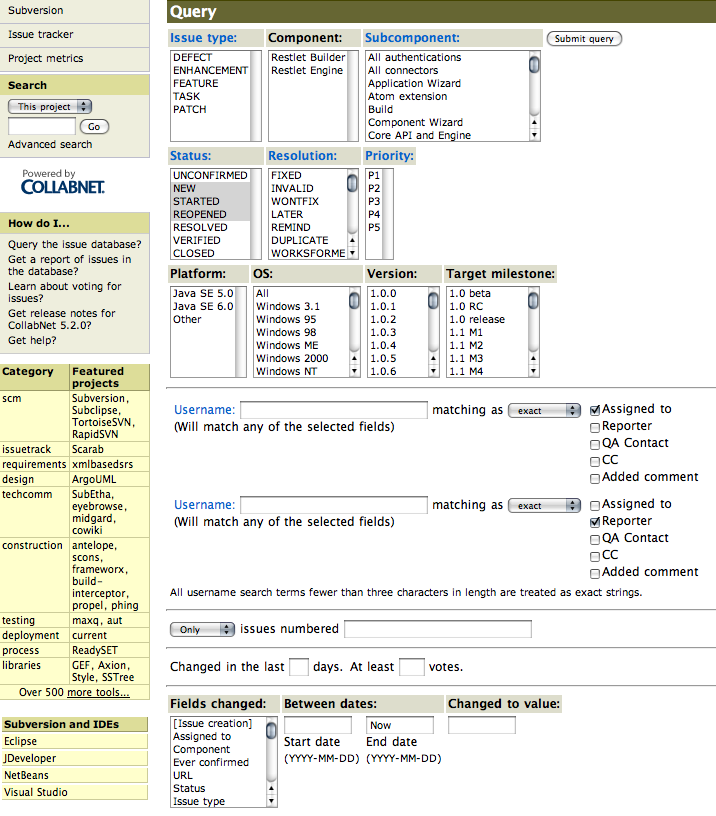
I was shocked to see this kind of interface! I know I'm a developer and I should love these kind of fine grained and detailed options to query an issues tracker, but that's too much! It's not the first time that I see this interface, Java.net uses it too and I just think it's a PITA to use! Compare it to google's code hosting issue tracker interface:
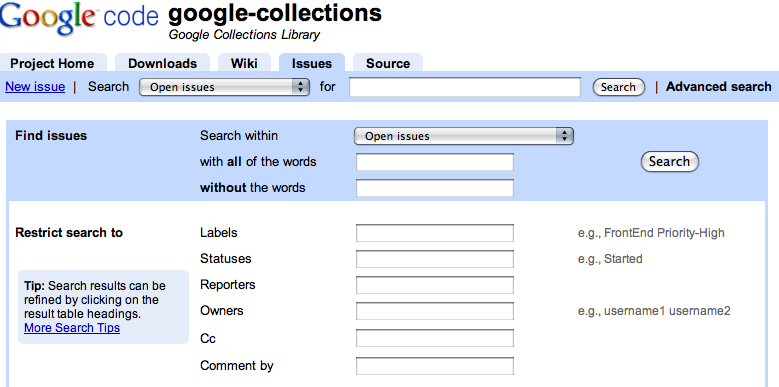
It's worlds apart in terms of usability and ease of use! And the screenshot above even shows the "advanced" search mode. In most cases, you can find everything with a single search box - google like!
I think, if you want the community to interact and contribute to your project, make it as easy as possible for them. They are trying to help you! We all know the problem of issues reported multiple times or reporters not taking time to correctly file an issue. However, every feedback is valuable and you can always ask for further and more detailed descriptions, if necessary.
Coming back to my bug in Restlet, after I managed to query the issue tracker, I saw that it had already been reported. So I decided to switch back to the current stable version. Unfortunately, I had to jump through a couple of hoops to make it work on the GAE, but that's another story altogether.
The current version of Restlet is 1.1, but when I compared it to the upcoming version 1.2-M2. it was clear that I would start using that right away. It has built in Google App Engine support and uses an Annotation driven approach, which increases testability and ease of use. This is one of the rare uses cases, where I think Annotations are perfectly suited, but I'm digressing. Overall, it was a natural choice to use the milestone build 1.2 right from the beginning.
After a couple of weeks of coding against 1.2-M2, I started to encounter a couple of weird side effects. After testing the code against the current stable version, it was clear, that it must be a bug in the 1.2 milestone release. So I checked the Restlet site, which nicely describes the process of reporting bugs.
Before entering a new report, you should query the current issue database for similar open issues.
As a decent developer, I followed the link to the issue tracker and saw this:
I was shocked to see this kind of interface! I know I'm a developer and I should love these kind of fine grained and detailed options to query an issues tracker, but that's too much! It's not the first time that I see this interface, Java.net uses it too and I just think it's a PITA to use! Compare it to google's code hosting issue tracker interface:
It's worlds apart in terms of usability and ease of use! And the screenshot above even shows the "advanced" search mode. In most cases, you can find everything with a single search box - google like!
I think, if you want the community to interact and contribute to your project, make it as easy as possible for them. They are trying to help you! We all know the problem of issues reported multiple times or reporters not taking time to correctly file an issue. However, every feedback is valuable and you can always ask for further and more detailed descriptions, if necessary.
Coming back to my bug in Restlet, after I managed to query the issue tracker, I saw that it had already been reported. So I decided to switch back to the current stable version. Unfortunately, I had to jump through a couple of hoops to make it work on the GAE, but that's another story altogether.
April 16, 2009
More Playing with GAE
In my previous blog about the Google App Engine (GAE), I wrote about the problems I had encountered using JPA and Maven. In this post I want to share how using Groovy on the GAE worked out and what my impressions are on the scalability of the platform.
Inspired by SpringSource's blog on Groovy with the GAE and after almost a year, I decided to do some Groovy coding. I wrote a small Groovlet, which uses the JPA to fetch entities from persistent storage. Again, I'm quite astonished of how smooth coding can be:
To be fair, I have no Exception handling in this code and there is no finally making sure the EntitManager is closed at the end. Yet, it feels like Java without the clutter.
To get this working on the GAE, all you need to do is drop the groovy-all.jar into the WEB-INF/lib folder of your WAR file and add the GroovyServlet to your web.xml. You add your Groovlet to a groovy folder under WEB-INF and access it like a good old Servlet in your browser e.g. http://dlinsin-area51.appspot.com/HelloWorld.groovy.
Unfortunately there is one major drawback, which makes developing Groovy for GAE a real pain - local deployment of Groovlets is not working right now. It seems like Google has been notified about the issue, but even after a few days the bug is still in status "new", so I don't think there'll be a fix anytime soon. Since daily deployment is limited by a quota, I think this bug is almost a show-stopper and I wouldn't want to develop in Groovy for the GAE right now.
Let's turn our attention to performance and scalability. First off I have a disclaimer: I didn't run any thorough or scientific tests! Although I have some numbers to back up my opinion, you might want to run further tests before you draw a final conclusion.
To get us all on the same page, let's start with a little "theory". When I talk about performance it means something like this:
The same goes for scalability, although in general it's more subtle to properly define it:
With that out of the way let's head over to the test setup. It consists of a simple Apache JMeter test script, which puts my poor sample application under load. The script loads the start page http://dlinsin-area51.appspot.com, then inserts the name "JMeter" into the input field and submits the form. The submission results in a redirect to the start page again. I mainly wanted to test "writes" to the persistent storage, because in my experience that's the most hardest part to scale.


I ran the test script with 10 threads (blue shaded) and with 100 threads hitting my sample app. Each thread runs the test procedure 10 times. The results were quite interesting. If you take a closer look at the average response time of both samplers you can see only a small difference between 10 users and 100 users (or threads) hitting the application at the same time. The response time for inserting a row into the persistent storage went up insignificantly, which I think is quite astonishing, considering the increase of load.
However, you should take these results with a grain of salt. They merely exist to give me a hint of what the GAE is capable of. I would be interested in real benchmarks, because I think it's crucial to see how scalable the GAE is under field conditions.
Update: The test results are simply wrong! Thx for pointing it out Bernd, I'm working on it!
Update 2: Here comes the bugfix!


You might ask what happened? Frankly, I mixed up the pictures and didn't double check, before pushing out the post. Sorry about that! I ran the tests with the same specs as mentioned above again and as you can see from the results, this time it looks reasonable.
Based on the new numbers, I have to put my conclusion a little bit into perspective. It still think the GAE scales reasonably well, but the numbers are not that astonishing anymore.
Inspired by SpringSource's blog on Groovy with the GAE and after almost a year, I decided to do some Groovy coding. I wrote a small Groovlet, which uses the JPA to fetch entities from persistent storage. Again, I'm quite astonished of how smooth coding can be:
import javax.persistence.*
import java.util.List
import de.linsin.sample.gae.domain.User
import de.linsin.sample.gae.EMF

EntityManager em = EMF.getInstance().createEntityManager()
Query query = em.createQuery("SELECT u FROM " + User.class.getName() + " u")
List<User> users = query.getResultList()

for (User user : users) {
  out.println(user.getName() + " " + user.getLastname() + "<br/>")
}

em.close();
To be fair, I have no Exception handling in this code and there is no finally making sure the EntitManager is closed at the end. Yet, it feels like Java without the clutter.
To get this working on the GAE, all you need to do is drop the groovy-all.jar into the WEB-INF/lib folder of your WAR file and add the GroovyServlet to your web.xml. You add your Groovlet to a groovy folder under WEB-INF and access it like a good old Servlet in your browser e.g. http://dlinsin-area51.appspot.com/HelloWorld.groovy.
Unfortunately there is one major drawback, which makes developing Groovy for GAE a real pain - local deployment of Groovlets is not working right now. It seems like Google has been notified about the issue, but even after a few days the bug is still in status "new", so I don't think there'll be a fix anytime soon. Since daily deployment is limited by a quota, I think this bug is almost a show-stopper and I wouldn't want to develop in Groovy for the GAE right now.
Let's turn our attention to performance and scalability. First off I have a disclaimer: I didn't run any thorough or scientific tests! Although I have some numbers to back up my opinion, you might want to run further tests before you draw a final conclusion.
To get us all on the same page, let's start with a little "theory". When I talk about performance it means something like this:
... performance is characterized by the amount of useful work accomplished by a computer system compared to the time and resources used.
...performance may involve one or more of the following:Short response time High throughput
The same goes for scalability, although in general it's more subtle to properly define it:
...scalability is a desirable property of a system, a network, or a process, which indicates its ability to either handle growing amounts of work in a graceful manner, or to be readily enlarged.
With that out of the way let's head over to the test setup. It consists of a simple Apache JMeter test script, which puts my poor sample application under load. The script loads the start page http://dlinsin-area51.appspot.com, then inserts the name "JMeter" into the input field and submits the form. The submission results in a redirect to the start page again. I mainly wanted to test "writes" to the persistent storage, because in my experience that's the most hardest part to scale.
I ran the test script with 10 threads (blue shaded) and with 100 threads hitting my sample app. Each thread runs the test procedure 10 times. The results were quite interesting. If you take a closer look at the average response time of both samplers you can see only a small difference between 10 users and 100 users (or threads) hitting the application at the same time. The response time for inserting a row into the persistent storage went up insignificantly, which I think is quite astonishing, considering the increase of load.
However, you should take these results with a grain of salt. They merely exist to give me a hint of what the GAE is capable of. I would be interested in real benchmarks, because I think it's crucial to see how scalable the GAE is under field conditions.
Update: The test results are simply wrong! Thx for pointing it out Bernd, I'm working on it!
Update 2: Here comes the bugfix!
You might ask what happened? Frankly, I mixed up the pictures and didn't double check, before pushing out the post. Sorry about that! I ran the tests with the same specs as mentioned above again and as you can see from the results, this time it looks reasonable.
Based on the new numbers, I have to put my conclusion a little bit into perspective. It still think the GAE scales reasonably well, but the numbers are not that astonishing anymore.
April 13, 2009
Playing with Google App Engine
I'm jumping on the hype wagon and checking out the Google App Engine (GAE) for Java. After writing a simple sample application using Servlets, Groovlets and the JPA, I want to share with you the bumpy ride I had.
If you are interested in checking out the sample application you can either download it or check it out on github.
Fankly, I only had a bumpy ride, because I didn't follow Google's suggestion to use the Eclipse IDE plug-in together with a set of ANT tasks, they provide. Instead I wanted to use IntelliJ and Maven. Another suggestions of Google I didn't follow, is to use Java Data Object (JDO) as a persistence API. Yes, that's right, Google suggests JDO as a preferred way to store data. If you are working on a somewhat up to date Java enterprise application, you are probably using the Java Persistence API (JPA) instead. The difference between the two standards, according to wikipedia, are:
Google's underlying persistence layer is called Bigtable. It's designed to scale across distributed systems, by being non-relation. That means you can dump your data into Bigtable, without brooding over your schema first. On the question why Google favors JDO over JPA, I think it's because you are not dealing with an RDBMS, but Bigtable.
The first thing I did was to write a simple hello world JSP and Servlet and packaged it as a WAR file. Thanks to IntelliJ's built-in enterprise support, I was up and running in no more than 10 minutes. The only difference to a regular enterprise application is the file appengine-web.xml. It contains your application identifier and version. The versioning schema is quite interesting. You can configure which version a user sees and simultaneously deploy a new version for testing.
Google provides a couple of command-line tools, which help you to start a local version of the app engine and upload your application to the cloud. Once you are online, you can access your server logs through a dashboard. Unfortunately I wasn't able to see the logs instantly, after encountering errors. I had to wait for a couple of seconds, which is pretty annoying and makes local testing much more important.
The first hurdle I had to overcome was integrating JPA. Google uses an implementation called DataNucleus, which relies on post-compile bytecode manipulation of your entities. I had the hardest time integrating the bytecode manipulation with my Maven build. Fortunately, the App Engine Google Group was very helpful and the problem was solved quickly. After a couple of hours, I was able to run my first JPA enabled application, without thinking about deployment or database issues. No problems with getting a server to run or twiddling with database settings - the stuff just runs.
As a developer, your probably don't want be bothered with infrastructure, which sometimes looks like black magic. I really like the completely transparent way of developing for the GAE, but I'm skeptical if I'd want to rely my business on this kind of hosting. With Amazon's EC2 you still have the configuration of the system under control and that's probably important, if you want to run a business on it. In terms of pricing, I can't really say much. To me it looks almost the same, except that with GAE you have a quota on everything. There's even a daily quota on datastore API calls, which can't be increased even by paying for it. That's a bit of a bummer! However, I think they chose the quotas reasonably and maybe the are being increased after the public release of the GAE for Java.
In my next blog post, I will cover some more details on how to run Groovlets. I also did some simple load testing with Apache JMeter to get a feeling on how GAE scales.
If you are interested in checking out the sample application you can either download it or check it out on github.
Fankly, I only had a bumpy ride, because I didn't follow Google's suggestion to use the Eclipse IDE plug-in together with a set of ANT tasks, they provide. Instead I wanted to use IntelliJ and Maven. Another suggestions of Google I didn't follow, is to use Java Data Object (JDO) as a persistence API. Yes, that's right, Google suggests JDO as a preferred way to store data. If you are working on a somewhat up to date Java enterprise application, you are probably using the Java Persistence API (JPA) instead. The difference between the two standards, according to wikipedia, are:
... JPA, however, is an Object-relational mapping (ORM) standard, while JDO is an Object-relational mapping standard and a transparent object persistence standard. JDO, from an API point of view, is agnostic to the technology of the underlying datastore, whereas JPA is being oriented totally around RDBMS datastores.
Google's underlying persistence layer is called Bigtable. It's designed to scale across distributed systems, by being non-relation. That means you can dump your data into Bigtable, without brooding over your schema first. On the question why Google favors JDO over JPA, I think it's because you are not dealing with an RDBMS, but Bigtable.
The first thing I did was to write a simple hello world JSP and Servlet and packaged it as a WAR file. Thanks to IntelliJ's built-in enterprise support, I was up and running in no more than 10 minutes. The only difference to a regular enterprise application is the file appengine-web.xml. It contains your application identifier and version. The versioning schema is quite interesting. You can configure which version a user sees and simultaneously deploy a new version for testing.
Google provides a couple of command-line tools, which help you to start a local version of the app engine and upload your application to the cloud. Once you are online, you can access your server logs through a dashboard. Unfortunately I wasn't able to see the logs instantly, after encountering errors. I had to wait for a couple of seconds, which is pretty annoying and makes local testing much more important.
The first hurdle I had to overcome was integrating JPA. Google uses an implementation called DataNucleus, which relies on post-compile bytecode manipulation of your entities. I had the hardest time integrating the bytecode manipulation with my Maven build. Fortunately, the App Engine Google Group was very helpful and the problem was solved quickly. After a couple of hours, I was able to run my first JPA enabled application, without thinking about deployment or database issues. No problems with getting a server to run or twiddling with database settings - the stuff just runs.
As a developer, your probably don't want be bothered with infrastructure, which sometimes looks like black magic. I really like the completely transparent way of developing for the GAE, but I'm skeptical if I'd want to rely my business on this kind of hosting. With Amazon's EC2 you still have the configuration of the system under control and that's probably important, if you want to run a business on it. In terms of pricing, I can't really say much. To me it looks almost the same, except that with GAE you have a quota on everything. There's even a daily quota on datastore API calls, which can't be increased even by paying for it. That's a bit of a bummer! However, I think they chose the quotas reasonably and maybe the are being increased after the public release of the GAE for Java.
In my next blog post, I will cover some more details on how to run Groovlets. I also did some simple load testing with Apache JMeter to get a feeling on how GAE scales.
